

Saved description
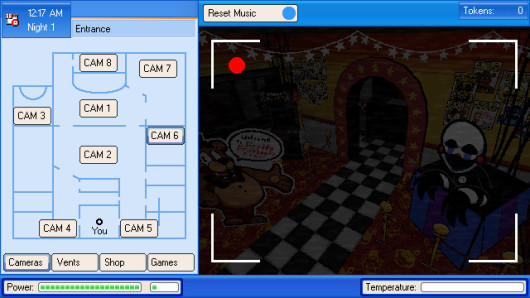
Adds a system that lets you manage UI skins in Five Nights at Frickbear's 3.
Changes made in skins are hot reloaded. Adding them while the game is running or swapping them in-game (using the settings menu) is also possible.UI skins reside in local app data folder of the game (%localappdata%\Frickbears3\uiSkins).
To add a skin, add a folder with the name of the skin you prefer (spaces are allowed) inside the aforementioned folder and run the game with the mod applied. After the game loads, the sprites will appear inside that folder. There will be also a json file called ui.json, which will let you edit UI elements, like position or color.The mod is not entirely finished, there's more to add.
Right now, the system applies changes in:• HUD when in Office
• Camera UI sprites
• Custom Night menu
• Shop items
Things that are planned to be added:• Mute Call button
• UI elements of Mendo's shop items, like Deathcoin animatronic menu
• Much more options for Custom Night UI elements
• Upgrade Cadet shop item icons
Before installing
- Keep an untouched copy of the current game before replacing any file.
- Check the archive contents and version before combining it with another mod.
- Test one package at a time so a broken or conflicting change can be rolled back.
Snapshot activity
Views
1,947
Downloads
404
Likes
17
Comments
12